

From edge to cloud, a well-orchestrated Data Collection Rule enables telemetry to flow intelligently and reliably
Background
Azure Monitor is is Microsoft’s monitoring platform for Azure that collects, analyzes, and acts on telemetry data from both cloud infrastructure and applications. It provides real-time insights through metrics, logs, and alerts, enabling users to ensure optimal performance while quickly detecting and resolving issues.
Within Azure Monitor, I led the design of Data Collection Rules (DCR), a foundational component that defines which data - such as syslogs, events, and metrics - is collected from various Azure resources. It then transforms the data to meet users requirements, and routes it to destinations like Log Analytics, Azure Monitor Workspace, and Microsoft Fabric, etc. Today, DCR supports over 50,000 monthly active users and plays a critical role in helping customers streamline their observability workflows.
Problem statement
Data Collection Rules (DCR) are often the first step for users to customize data collection and configure data flow. Most users begin from the resource level - either a single resource or a group. In fact, studies show that 45% of over 50,000 monthly active users start with the resource entry point.
However, before this project, users faced three major challenges:
No built-in support for scaling across multiple resources.
A confusing configuration experience and lack of guidance.
Technical limits that prevented support for some popular data types and destinations.
Project goals
Empower users to configure data collection across multiple resources simultaneously
To resolve the issues identified above, we defined three primary goals for the project:
Streamline the configuration process to make it intuitive and accessible for users of all expertise levels
Expand DCR capabilities to support widely used data types and destinations.
My focus
This project showcases my ability to simplify technical complexity for users with varying expertise. Designing for diverse telemetry data and destinations required balancing data structure, flexibility, and scalability. Because DCR is a core component of Azure Monitor, my work had to support both intuitive workflows for users and seamless integration across the monitoring ecosystem. My focus areas were:
Experience Design: Created clear, low-friction workflows and interfaces that guided users through complex configurations. Built and tested interactive prototypes to validate concepts and refine the experience.
User Research: Collaborated with researchers to conduct interviews, extract actionable insights from a highly technical audience, and translate pain points into design decisions that shaped product direction.
Product & System Thinking: Aligned solutions with business goals and user value. Developed technical fluency to bridge design and engineering. Created solutions that balance user needs with system constraints.
Collaboration: Led cross-functional workshops and design reviews with low-fidelity mockups, helping teams align early, surface technical considerations, and shape the product direction from the start.
Design Examples
The following examples illustrate key design decisions and how they addressed user pain points.
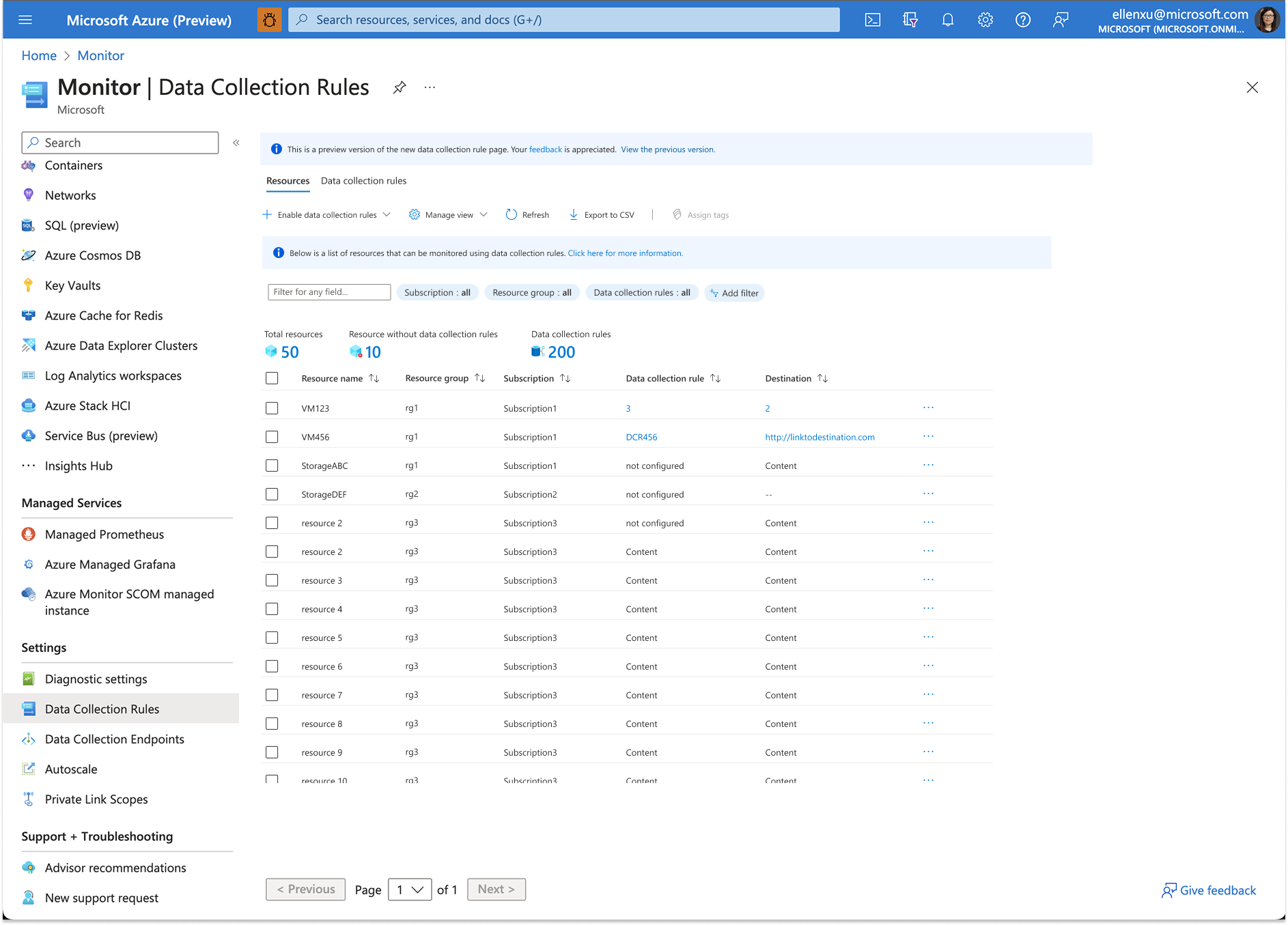
Example 1: Created a resource-centric view for clear visibility into data collection setup.
In contrast to the current flow, where users only see a list of DCRs without visibility into the resources they belong to, this new view lets users access information directly from a resource perspective. They can initiate data collection after selecting resources and filter the view by parameters such as DCR status, subscription, resource group, destination type, or resource type. This makes it far easier to manage large numbers of resources efficiently.
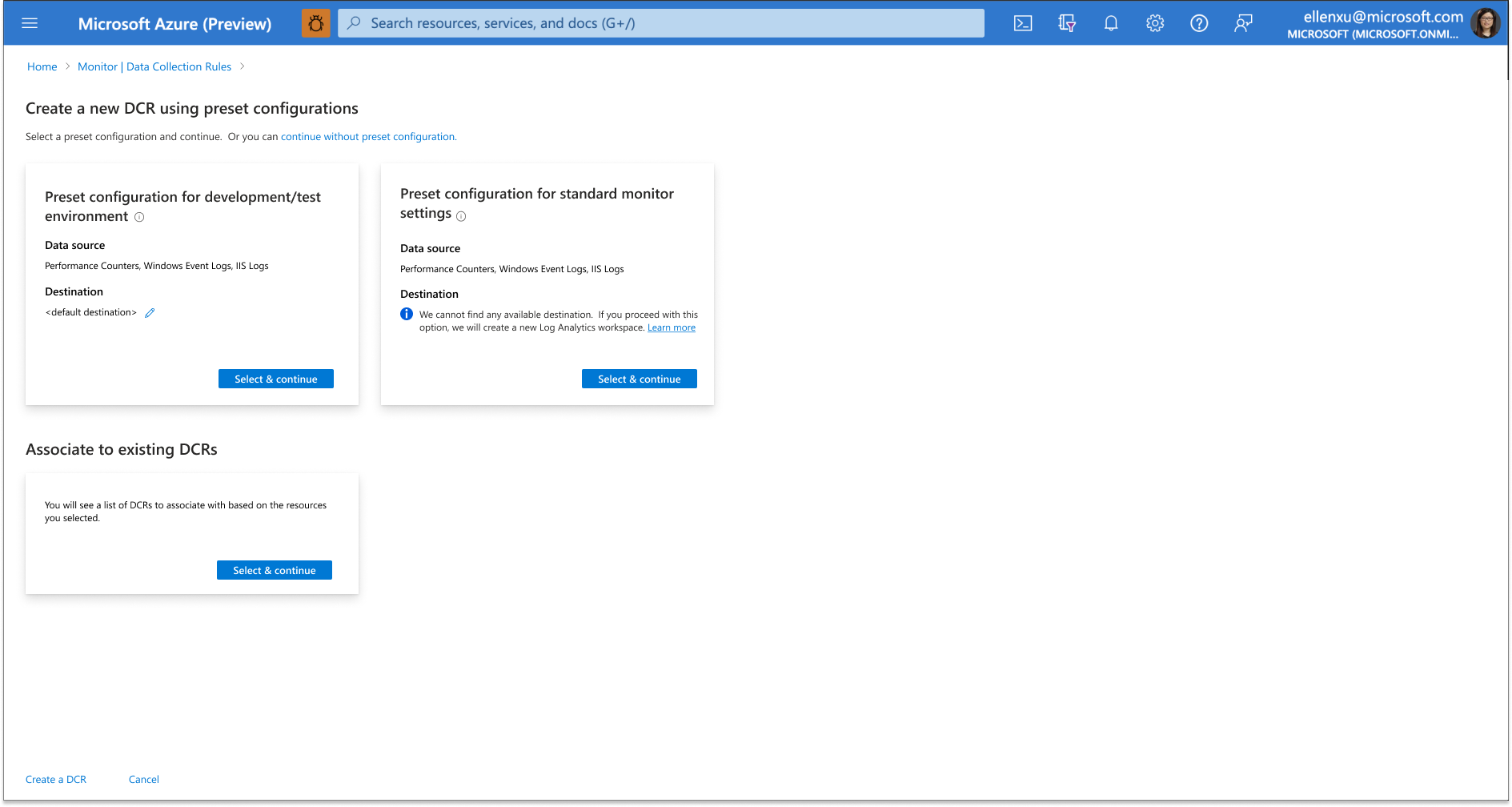
Example 2: Introduced three curated options to streamline setup for common use cases.
Instead of requiring users to configure everything from scratch, the system now provides a tailored set of options optimized for the most common use cases. This helps users quickly set up a data pipeline and begin monitoring with minimal effort. At the same time, advanced users retain the flexibility to create custom DCRs when needed.
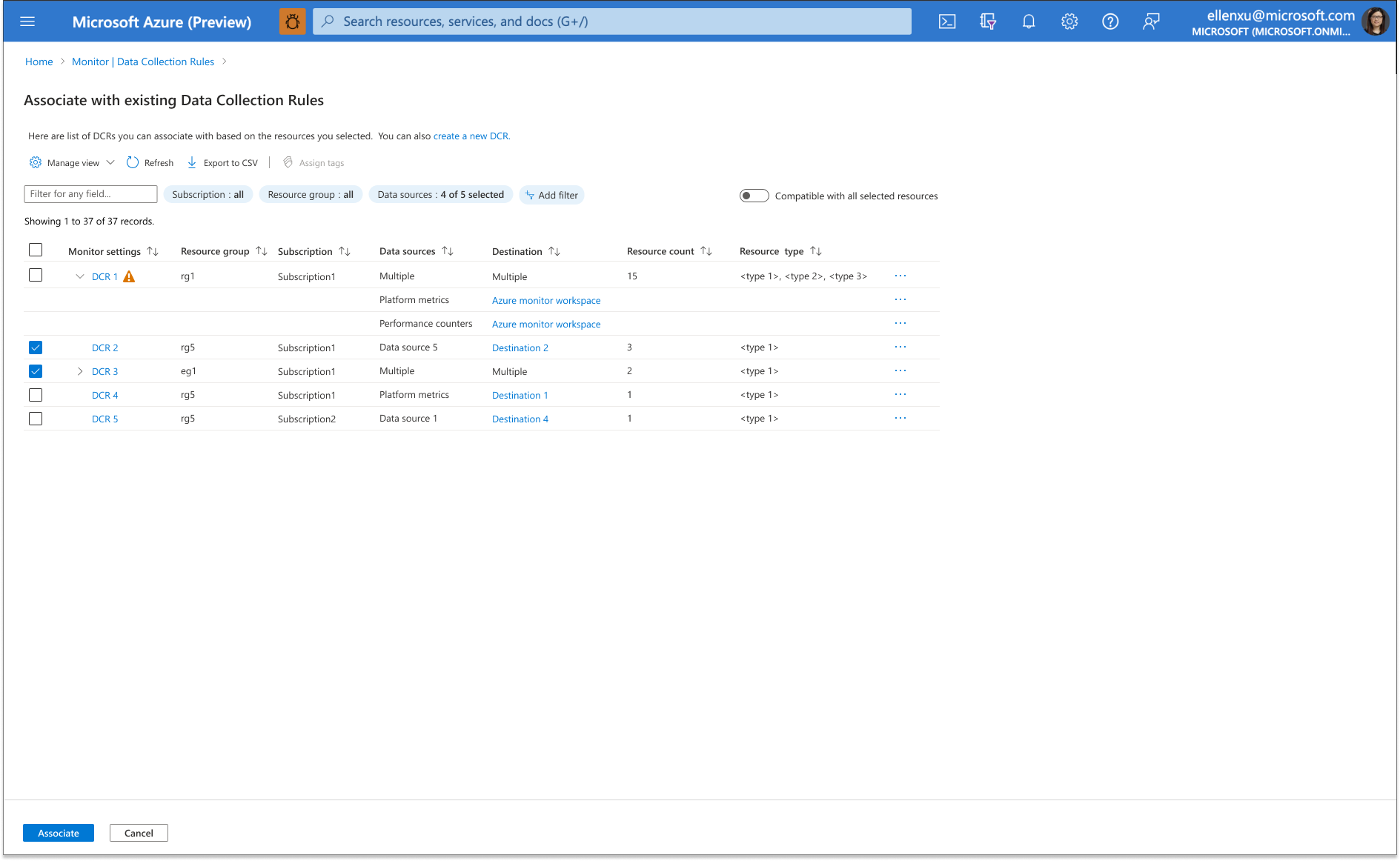
Example 3: Example 3: Introduced an option to associate resources with existing DCRs, reducing reconfiguration and costs.
Users are given the option to view DCRs that match all selected resources or just a subset. A warning appears when only partial compatibility exists, guiding users to make confident, informed choices. Because creation and association are the most frequent DCR-related actions, we tested multiple design variations with users to validate the workflows. This ensured the final flows were both intuitive and effective, saving users time while lowering configuration effort and cost.
Outcome
“The redesign drove measurable improvements in customer satisfaction (CSAT), adoption, and support efficiency for Azure Monitor. Since launch:
35,000+ users adopted the new experience
Over half of Azure Monitor’s 50,000 monthly active users have already switched, with adoption continuing to grow.
Support cases dropped by 30%
Monthly cases related to DCR decreased from ~240 to ~170, reflecting improved usability and reduced friction.
User feedback confirmed the impact of these improvements, especially among highly technical audiences:
“I always start from the resource, so I’m very happy this design begins from the resource and resource group. If you can make it easier for me, that’s quite good.”
– Systems Admin at Equity Bank
“It’s certainly a lot better than what we have now. At the moment I have to go into each DCR, check the JSON, see where the destinations are, what the transformations are, and so on.“
-Cyber Security Architect at Becca Consulting
Reflection
With many partner teams involved and frequent new requests, this project went through multiple executive reviews that sometimes surfaced contradictory or repeated feedback. Navigating this process taught me the importance of documenting leadership input carefully and prioritizing feedback effectively. I grew as a designer by learning how to manage stakeholders in complex, cross-team projects and ensure that future iterations stayed aligned.
Next step
Building on the successful release of the new DCR experience, I partnered with the product team to define the strategy and vision for monitoring coverage—a capability that had never existed natively at scale in Azure Monitor. Previously, users had to manually build custom dashboards to understand what resources were being monitored and where gaps existed. Our new initiative introduces a scalable, integrated experience that surfaces monitoring coverage out of the box, enabling users to quickly assess their environment and take action. This effort has significantly expanded the scope of my work and elevated the strategic impact of Azure Monitor as a platform. The product has been announced in Microsoft Ignite 2025.